
Show third-party service status on your status page
Built for teams that depend on AWS, GitHub, Stripe, or any external service — and want to be honest about it.
When an upstream vendor goes down, your customers deserve to know it's not you. Display live vendor status directly on your status page and stop fielding support tickets for outages you didn't cause.
 Start Free Trial
41+ providers included. No code required.
41+ services, ready to display
Pick the vendors your product depends on. Each one shows a live status box — operational, degraded, or down — updated automatically.








































Missing a provider you depend on? Email us with the service name — we add new ones based on customer requests.
Three steps from settings to live status
No API keys, no code, no polling logic to write. Just pick your vendors and they appear on your status page.
Enable providers
Open Status Pages → Settings → Dependencies and toggle on the services your product relies on. Each status page has its own independent list — your API page can show AWS while your chat integration shows Slack.
Choose what affects your status
For each provider, set Affects Overall to decide whether a vendor outage can raise your page's overall severity. Use this sparingly — only for truly critical dependencies. Informational providers display without changing your headline status.
Live status boxes appear
Enabled providers render as compact boxes above your component groups — logo, name, and a live status label. If a vendor's status page is available, the box links out directly. Status is fetched and cached automatically, no manual refresh needed.
Stop taking the blame for someone else's outage
When GitHub is down and your CI pipeline is broken, your customers will find out eventually. It's better if they find out from your status page — with context — than from a flood of support tickets.
- Affected by banner When a vendor is having issues, a warning banner appears above your components: "This service is currently affected by a GitHub outage." Clear, factual, no guesswork.
- Depends on banner Even when everything is operational, an informational banner can show which upstream services your product relies on — proactive transparency before anything goes wrong.
- Custom sort order Control the order providers appear in. Put your most critical upstream services first so visitors see what matters at a glance.
- Direct links to vendor status Each provider box links out to the vendor's own status page so customers can dig into the details themselves — without contacting you.
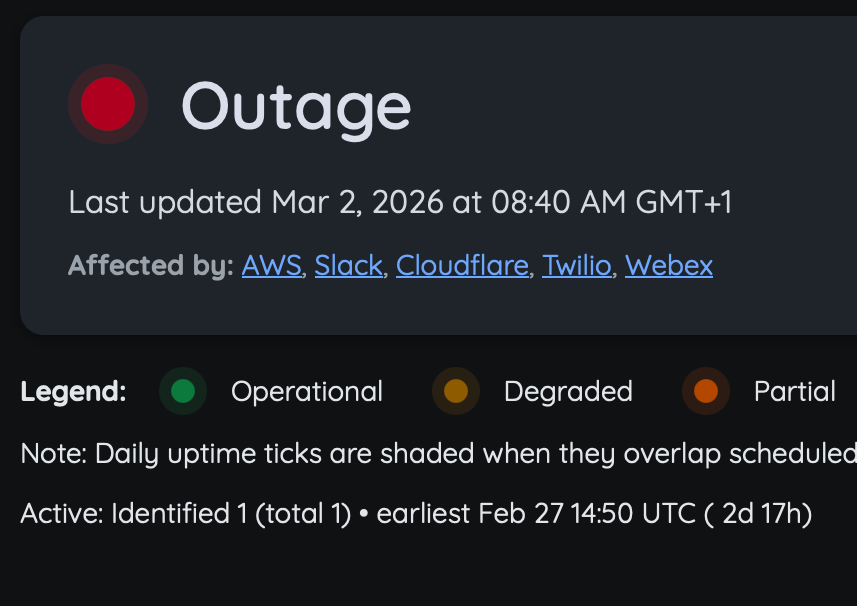
The "Affected by" banner appears automatically when a tracked vendor reports an issue.
Each status page is independent
Not every vendor matters to every status page. Your public API status page might depend on AWS and Cloudflare. Your developer tools page might depend on GitHub and Vercel. Your support hub might depend on Zendesk.
Configure dependencies separately for each status page. The same provider can have different settings — even different "Affects Overall" behaviour — across your pages.
- Independent provider lists per status page
- Per-provider Affects Overall toggle
- Custom display order per page
- Option to include informational dependencies in the banner
Common dependency setups
- SaaS API — AWS (affects overall), Cloudflare (informational)
- Developer platform — GitHub (affects overall), Vercel (affects overall)
- Support & comms — Zendesk (informational), Slack (informational)
- E-commerce/billing — Twilio (affects overall), Mailgun (informational)
Questions about status page dependencies
How providers work, what affects your overall status, and how to request new ones.
Be transparent when it matters most
Show your customers what's happening upstream — before they open a support ticket.