
Private status pages for teams, customers, and internal stakeholders
Built for incidents that should not be broadcast to the entire internet.
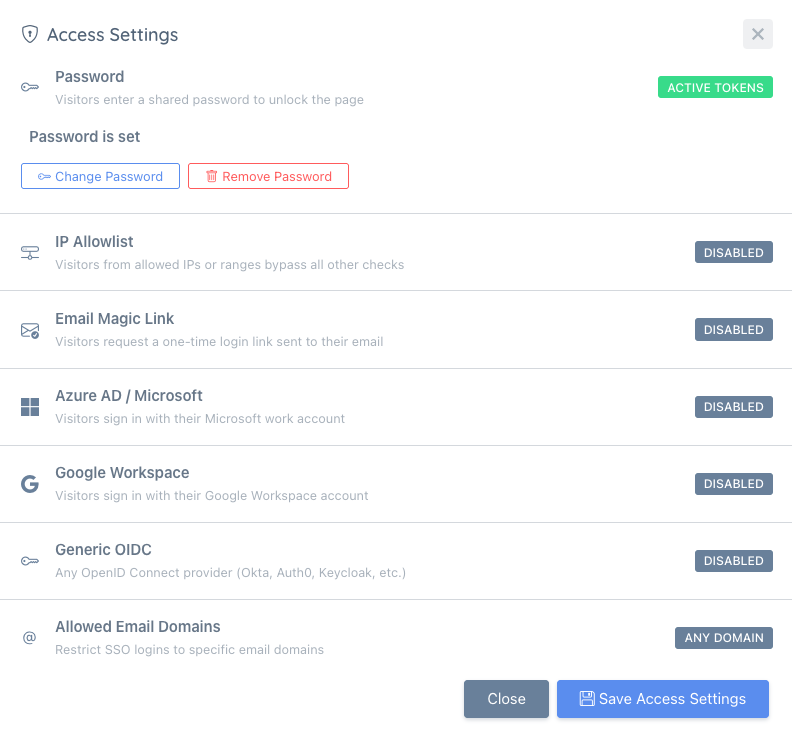
Control access with Azure AD, Google Workspace, OIDC, email magic links, IP allowlisting, or a shared password so the right people stay informed without making the page public.
 Create your private status page
Access control that actually works
Six access methods — pick the one that fits your audience, or combine them.
Azure AD / SSO
Authenticate with Microsoft Entra ID. Anyone outside your tenant is blocked automatically — no account setup required.
Google Workspace
Let your team sign in with their Google Workspace account. Restrict to your domain — anyone outside is blocked automatically.
Generic OIDC
Connect any OpenID Connect provider — Okta, Auth0, Keycloak, and more. Works with any standard OIDC issuer.
IP allowlisting
Restrict access to specific IP addresses or ranges. Visitors from outside allowed networks are blocked without any login prompt.
Email magic links
Grant access to specific email addresses. Visitors request a one-time login link — no password or Microsoft account needed.
Shared password
Set a single password for the page. Simple to set up — good for small teams or short-lived internal pages.
Built for real-world operational visibility
Private status pages fit naturally into how modern teams already communicate.
Internal IT dashboards
Show the status of internal tools, corporate systems, and shared infrastructure to your IT team without a public footprint.
Branch / office connectivity
Let distributed teams check connectivity and service status for their location without contacting IT support first.
Customer-specific status pages
Share a dedicated status page with an enterprise customer. They see only their environment — no one else's data.
Vendor / partner visibility
Give vendors or integration partners a secure window into the services that affect them, without opening it to the public.
One platform, secure by design
- No public exposure unless you choose it. Pages are private by default. Flip a switch to make them public — or keep them locked to your identity provider forever.
- Works with your existing identity system. Azure AD, Google Workspace, or any OIDC provider — use what your team already authenticates with. No new directory, no new accounts.
- No additional tools needed. Configure private access directly from your status page settings — no third-party SSO middleware required.
If you are deciding between public and restricted communication, the University status pages hub includes practical guidance on private vs public pages and subscriber options.
Common questions about private status pages
Ready to share status securely?
Set up a private status page in minutes. Microsoft Entra ID, Google Workspace, OIDC, IP allowlisting, and more are available when your plan includes Private Pages.
Create private status page14-day free trial • No credit card required