
Status page maintenance windows
Planned work should be visible before it affects customers.
Schedule planned work, notify subscribers ahead of time, and keep your status page accurate before, during, and after maintenance.
 Start Free Trial
Create a maintenance window in minutes. Subscribers get notified automatically on your configured channels.
Communicate planned work with precision
State the timing, affected services, and expected impact before a change begins so customers know what to expect.
- Schedule in Advance Set a start/end time and publish ahead of time so users know exactly what to expect — and when it ends.
- Component & Monitor Linking Tie maintenance to specific components and monitors so your status page shows exactly what's affected, not a vague site-wide banner.
- 3-Stage Notifications Subscribers are notified when maintenance is announced, when it begins, and when it completes — no manual follow-up at each stage.
- Status Page Banner Upcoming and active windows appear prominently on your public status page so visitors see them before filing a support ticket.
- Private Maintenance Windows Keep internal infrastructure work off your public page. Show maintenance selectively — only on the status pages that need it.
- Maintenance History Every completed window stays on record — a transparent log that builds customer trust and helps with post-incident reviews.
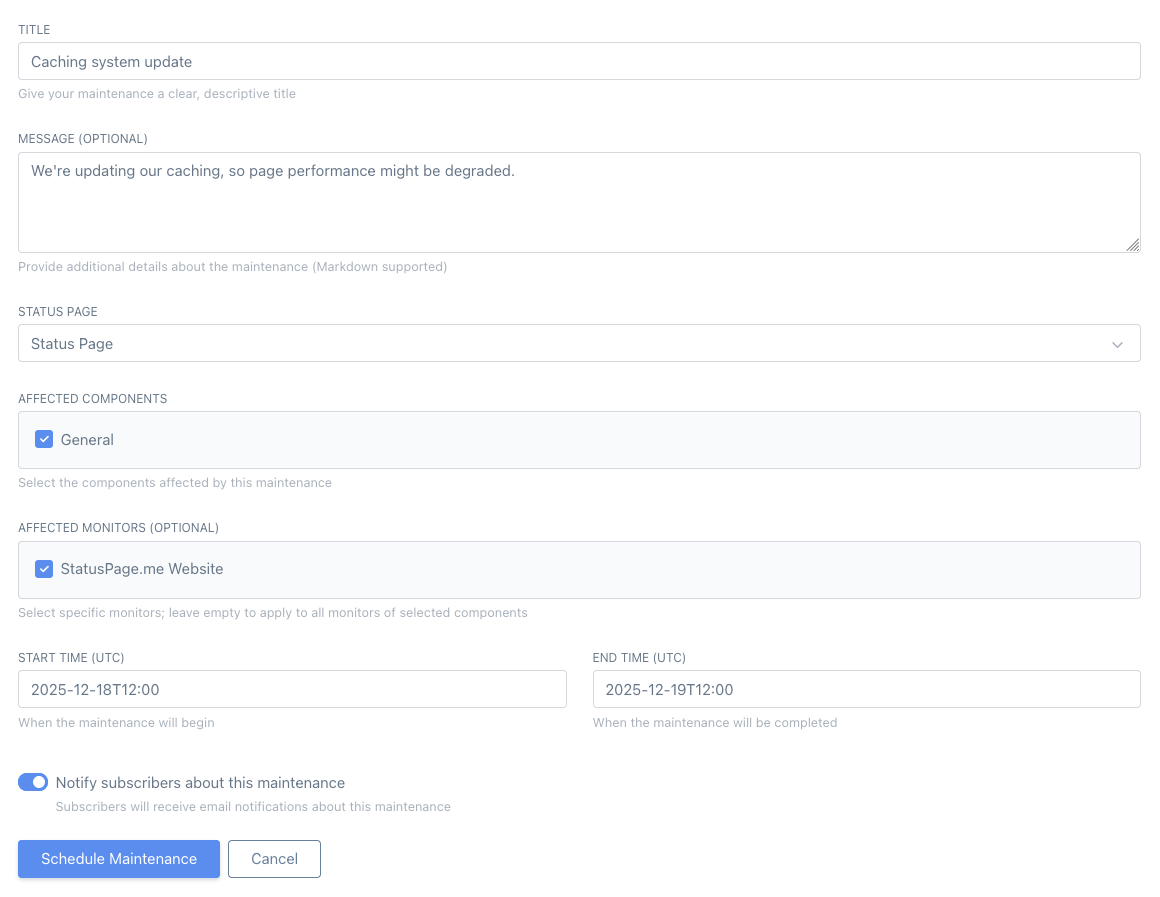
Plan, publish, notify, and close the record
Maintenance windows keep planned downtime distinct from unplanned incidents and preserve a clear customer-facing timeline.
Create a maintenance window
Give it a title, write your message (Markdown supported), choose the status page, and pick a start and end time. Publish immediately or save as a draft.
Select what's affected
Tie the window to components and monitors so your status page shows exactly which services are impacted, not a blanket site-wide notice.
Notify subscribers automatically
Subscribers are notified via email, Discord, Slack, Telegram or webhooks when the window is announced, when it starts, and when it completes.
Related operational guidance: status page updates, incident communication, and status page notifications.
Perfect for routine ops work
Anything that might cause degraded performance or brief downtime belongs here. If you're doing planned changes, communicate them — your customers will thank you.
- Database upgrades and migrations
- Cache rebuilds, deploys, and infrastructure changes
- DNS changes and planned cutovers
- Third-party maintenance you want to proactively announce
- Certificate renewals, IP changes, or provider migrations
Common questions about maintenance windows
A quick overview of how planned maintenance, notifications and history work in StatusPage.me.
Ready to schedule your first maintenance window?
Create a window, select affected components, and notify subscribers automatically — in minutes.