
Last updated: 2026-09-12
Website Monitoring Types Explained
Different services fail in different ways, so the right monitor type depends on what you want to verify.
This guide explains the monitoring types currently available in the dashboard, what each one checks, and when to choose Site, API, DNS, or Ping (ICMP) monitoring.
For the broader strategy behind monitor design, uptime vs availability, SSL coverage, and false-positive reduction, see the University uptime monitoring hub.
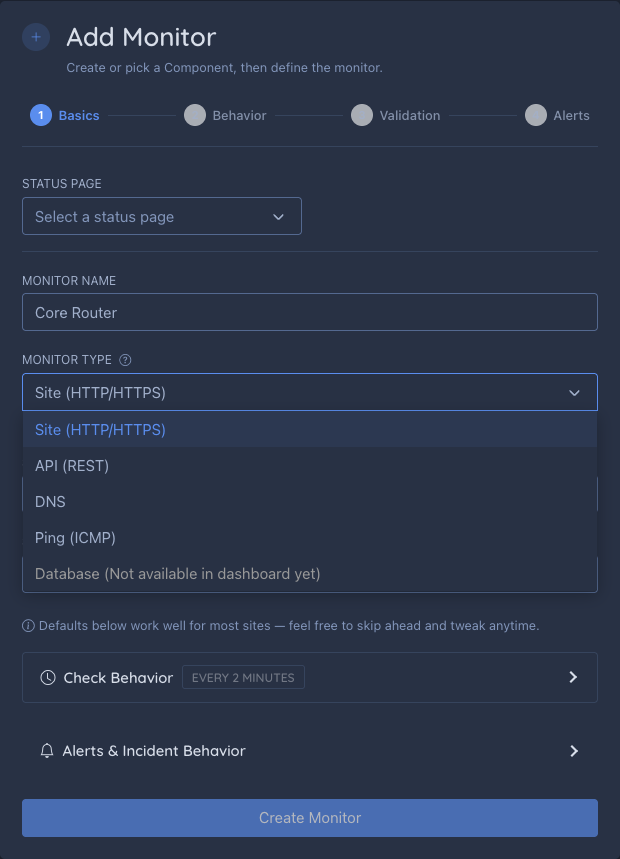
In the current Add/Edit Monitor dashboard flow, these are the four monitor types you can actively configure end to end. After you choose a type, the same form lets you set the target, validation (where applicable), check interval, and any plan-dependent monitoring locations.
Site Monitors
Site monitors are the default choice for checking whether a page or endpoint is reachable and behaving the way you expect.
If you mainly care that a page loads, returns the right status, and optionally contains specific content, Site monitoring is the best place to start.
How it works:
- Sends an HTTP or HTTPS request to your URL
- Checks whether the response matches your validation rules
- Measures how long the response took
Best for:
- Websites and web applications
- Landing pages
- Login pages, careers pages, and public dashboards
- Basic uptime checks where availability comes first
Helps you catch:
- Full-page outages
- Unexpected redirects or error responses
- Pages that load but no longer show the text you expect
Example URLs:
https://www.yoursite.comhttps://status.example.com
Pro Tip: You can use a Site monitor as a lightweight job alert. Point it at a company’s careers page, then add a Body Contains condition for the title you want, such as
design engineerorplatform engineer. When that text appears on the page, your monitor can alert you before you happen to check the site manually.
API Monitors
API monitors are for endpoints where uptime alone is not enough and you need to validate the actual response.
Use API monitoring when you need control over the request and want to confirm that the response body, headers, JSON fields, or latency still match your expectations.
How it works:
- Sends an HTTP request using your selected method
- Optionally includes auth, headers, query params, and a request body
- Validates the response using body text, JSONPath, headers, status code, and response-time conditions
In the current Add/Edit Monitor form, request customization lives in Advanced Request Settings. When you choose POST, PUT, or PATCH, the dashboard shows a helper below HTTP Method so you can jump straight to that section and add query parameters, request headers, and a raw request body.
Live preview with your real request configuration: the preview badge doesn’t just probe the bare URL — it sends the actual method, authentication (Basic, Bearer, or API key header), custom headers, and request body you’ve configured in Advanced Request Settings. Change any of those fields and the preview marks itself stale so you know to re-check before saving; this is what lets the preview also suggest JSONPath conditions from a response that actually required your auth to reach.
Best for:
- REST APIs
- JSON health endpoints
- Authenticated health checks
- Webhooks and service-to-service endpoints
Helps you catch:
- APIs returning the wrong JSON even when they are still online
- Broken auth or missing headers
- Slow endpoints that are technically up but no longer healthy
Examples:
https://api.example.com/healthhttps://api.example.com/v1/statushttps://example.com/internal/ready
DNS Monitors
DNS monitors verify that a domain resolves the way it should.
They are useful when the main risk is not page rendering or API payloads, but whether traffic is being routed to the correct destination at all.
How it works:
- Queries DNS servers for your domain
- Checks if it returns the expected record
- Measures resolution time
Best for:
- Critical domains
- Detecting DNS hijacking
- Multi-region DNS setups
Helps you catch:
- Wrong DNS targets after provider changes
- Missing or broken mail-routing records
- DNS-level issues before they show up as website downtime
What it monitors:
- A/AAAA records (IP addresses)
- CNAME records
- MX records (email)
- TXT records
Ping (ICMP) Monitors
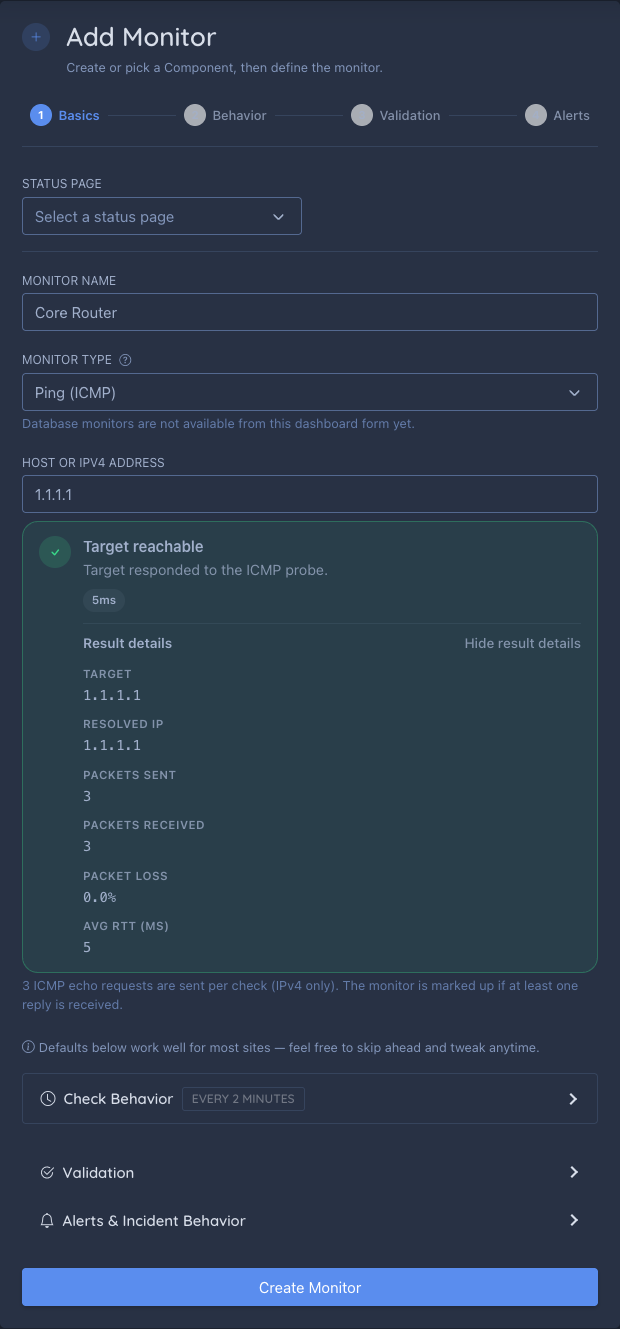
Ping monitors check basic network reachability at the IP layer — no HTTP request, no DNS record validation, just “does this host answer an ICMP echo request.”
Use Ping when the thing you’re monitoring doesn’t run a web server at all, or when you specifically want to catch network-path or host outages independent of anything happening at the application layer.
How it works:
- Resolves your target to an IPv4 address
- Sends 3 ICMP echo requests (1-second timeout each)
- Marks the check up if at least one of the 3 replies comes back
- If all 3 requests get no reply, runs one short confirmation probe against the same resolved address before finalizing the check as down — a brief, one-off network blip doesn’t need to look identical to a sustained outage
Ping reachability vs. application health: a Ping check only tells you whether the host answered an ICMP echo — it says nothing about whether a web server, API, or any other application on that host is working. Because of that, StatusPage.me never labels a Ping failure as a generic “outage.” Everywhere a Ping result shows up — the monitor card, Check History, notifications, and your public status page — it’s labeled as an ICMP reachability issue, distinct from an application-level outage:
- Notifications and incidents: a Ping failure raises “ICMP reachability issue” alerts and incident titles instead of “service disruption” wording, and the notification body spells out that no ICMP reply doesn’t by itself confirm the host or application is offline. Auto-incidents still work the same way for Ping monitors as any other type — they’re just labeled for what they actually detected.
- Public status page: a component whose only problem is its Ping monitor shows an “ICMP reachability issue” state instead of “Outage.” If that same component also has a Site, API, or DNS monitor that’s genuinely down or degraded, the real application state always takes priority — Ping evidence never hides a real outage, and never invents one on its own when everything else on the component is healthy.
/status.json: the machine-readable feed reflects the same rule — a component’sstatusfield only turns unhealthy from genuine Site/API/DNS/manual evidence; an ICMP-only problem instead sets an additionalicmp_reachability: "unreachable"field alongside an otherwise-unchangedstatus.
Best for:
- Servers, VMs, and bare-metal hosts with no web service
- Network gear — routers, firewalls, VPN gateways
- Internal infrastructure you can’t reach over HTTP
- A lightweight “is this host even on the network” check to pair with a Site or API monitor
Helps you catch:
- The host itself going down, independent of any application running on it
- Network-path outages between a monitoring region and your infrastructure
- Routing or connectivity problems before they show up as an application-level failure
Example targets:
203.0.113.10vpn-gateway.example.com
A Ping target is a bare hostname or IPv4 address — no https://, no port. IPv6 targets aren’t supported yet; if a hostname only resolves to an IPv6 address, the check reports that clearly instead of silently failing.
About packet loss: a check only needs one reply out of three to be marked up — partial packet loss doesn’t flip the status on its own. The result panel always shows the exact packet count, packet loss percentage, and average round-trip time, so you can see a host that’s degraded (say, losing 1 of 3 packets) well before it actually goes down.
As soon as you enter a valid target, the Add/Edit Monitor form runs a real probe and shows a preview badge with the resolved IP, packets sent/received, packet loss, and average RTT — the same live validation Site, API, and DNS targets already get.
Check History for a Ping monitor shows this same evidence per scheduled check — resolved IP, packets sent/received, packet loss percentage, and RTT — so you can see exactly what each check observed, not just an up/down pill.
Not Yet Available in the Dashboard Form
You may see Database listed in the monitor-type selector as a future option.
- In Add Monitor, it appears as unavailable and cannot be selected.
- In Edit Monitor, an existing database monitor may still open for reference, but it is not editable from that dashboard form.
Treat it as a roadmap placeholder rather than an active dashboard workflow.
Validation Options Across Types
Site and API monitors both support richer validation than a simple “is it up” check.
That means you can monitor for the right outcome, not just any response. The careers-page job alert example above is one case: the page can stay online for weeks, but the monitor only becomes useful when your target text appears.
In the Add and Edit Monitor forms, valid Site and API URLs can also trigger a preview badge with status, response time, and content type. When the preview returns JSON, the dashboard can suggest JSONPath conditions to speed up setup.
- Status Code for exact codes or ranges
- Body Contains for text-based responses
- JSONPath for structured API payloads
- Header for response-header assertions
- Response Time for latency-based success rules
Guide: Advanced Expected Conditions
Need ideas you can copy? See Monitoring Configuration Examples.
Choosing the Right Type
Use this quick rule of thumb:
- Choose Site when you are checking a page or simple endpoint.
- Choose API when you need request customization or structured response validation.
- Choose DNS when you need to confirm a domain resolves to the correct record.
- Choose Ping (ICMP) when you’re monitoring a host with no web service at all, or want a network-layer check independent of the application.
If you are comparing website monitoring types for a new service, start by asking what failure you care about most: page availability, API correctness, DNS resolution, or basic network reachability.
| What You’re Monitoring | Recommended Type |
|---|---|
| Website homepage | Site |
| Marketing page | Site |
| API endpoint | API |
| JSON health endpoint | API |
| Domain DNS | DNS |
| Mail routing records | DNS |
| Server or VPN gateway with no HTTP service | Ping (ICMP) |
| Basic network reachability | Ping (ICMP) |
Combining Monitor Types
For critical services, consider using multiple monitor types:
- Site monitor to confirm the website is reachable
- API monitor to validate your health endpoint returns the expected JSON
- DNS monitor to verify the domain still resolves correctly
- Ping (ICMP) monitor on the underlying host or gateway, as a network-layer baseline underneath the other three
This gives you broader coverage and makes it easier to pinpoint whether a problem starts at the network layer, the DNS layer, the application layer, or inside the API response itself.