
On-Call Scheduling (Starter Feature)
On-call scheduling lets you define a rotation (daily/weekly/custom shift length) so new incidents are automatically assigned to the right person — and escalated through multiple levels if no one responds in time.
It also supports shift-start notifications, one-click acknowledgment from email, override conflict detection, a visual Gantt timeline, and iCal calendar subscriptions.
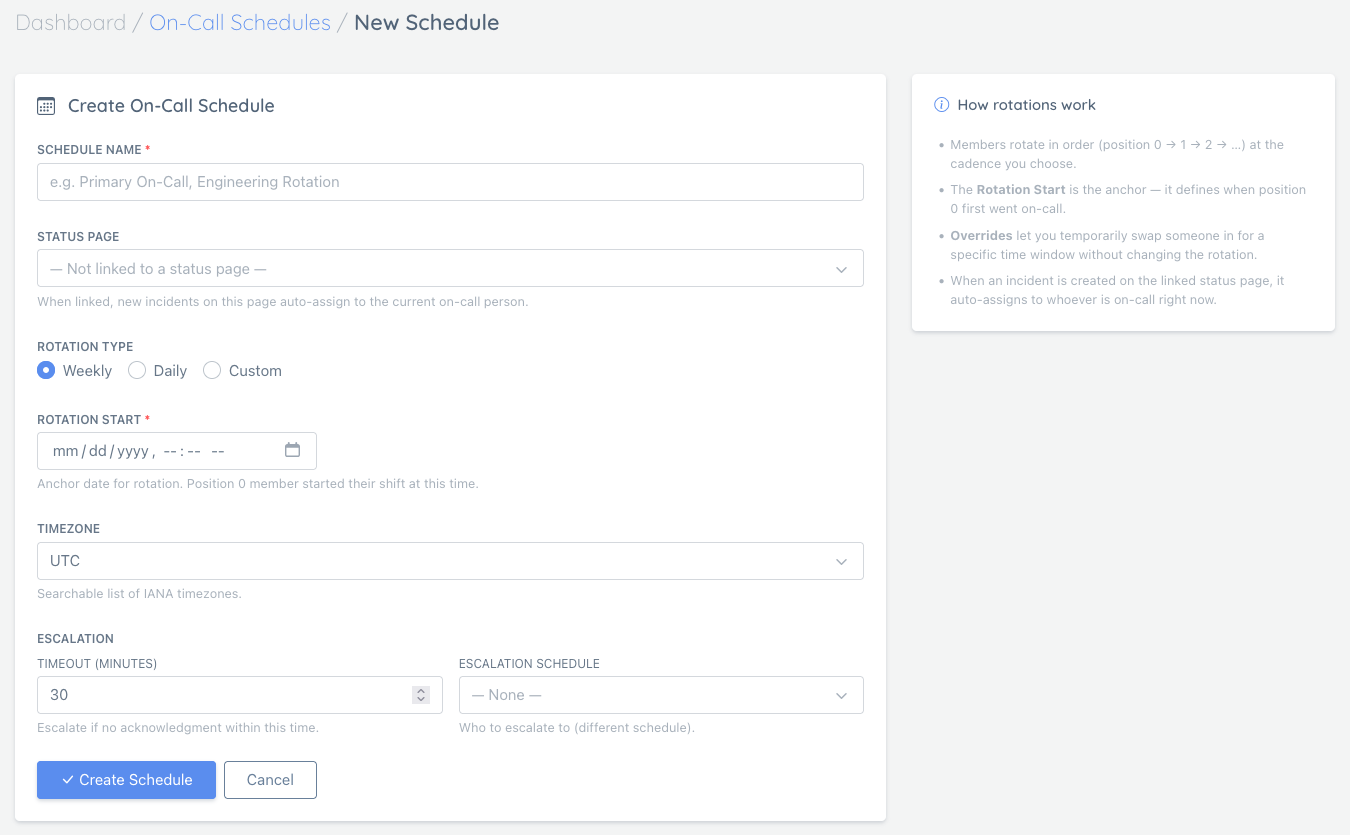
Where to Find It
In the dashboard, open:
- On-Call → On-Call Schedules
Direct URL: /user/on-call/schedules
Key Concepts
Schedules
A schedule defines:
- A rotation type (Weekly / Daily / Custom hours)
- A rotation start timestamp (the anchor for the rotation)
- A timezone (IANA timezones like
Europe/Paris,America/Los_Angeles) - An optional escalation policy (multi-level)
Linking a Schedule to a Status Page
You can link a schedule to a status page.
When linked, new incidents created on that status page auto-assign to whoever is on-call right now.
Related incident docs: Creating and managing incidents
Members
Members are the people who rotate in order (position 0 → 1 → 2 → …).
If a schedule has no members, there’s no one to assign to.
Overrides
Overrides temporarily swap in someone for a specific time window without changing the underlying rotation.
Conflict detection: if you try to create an override that overlaps an existing one, you’ll get a clear error instead of a silent duplicate.
What Triggers On-Call Assignment
On-call assignment happens when an incident is created for a status page that has an active on-call schedule linked.
This includes:
- Manual incidents you create in the dashboard
- Auto-incidents created by monitor failures
Email Notifications
All on-call emails include a “View schedule →” link back to the schedule detail page.
Assignment and shift-start emails also include a 7-day schedule table showing who is on-call each day (color-coded: blue = today, amber = override).
Shift-Start
When the rotation moves to a new person, they automatically receive:
- A “Your shift has started” email with the upcoming 7-day schedule
- A Slack / Discord / Telegram channel notification (if a notification channel is configured for the linked status page)
This happens within 60 seconds of the shift boundary — no manual action required.
Schedule Changes
Whenever the schedule is modified (member added/removed, override created/deleted, settings updated), all current rotation members receive a “Schedule updated” email with a description of the change and the new 7-day schedule table.
One-Click Acknowledge from Email
Assignment emails include a signed Acknowledge link. Clicking it marks the incident acknowledged immediately — no login required. The link is single-use and expires in 48 hours.
Every acknowledgment — whether via the one-click email link or the dashboard UI — is recorded in the schedule’s Alert Log so you have a full audit trail of who acknowledged, when, and through which channel.
“Take On-Call Now” Button
On the schedule detail page, any eligible team member can click Take On-Call Now to immediately become the on-call person for the rest of the current shift. This creates a self-override that expires when the natural shift ends.
Multi-Level Escalation
Each schedule can have an ordered Escalation Policy (step 1 → step 2 → step 3 …).
| Setting | Description |
|---|---|
| Escalate after N min | How long to wait for acknowledgment before firing this step |
| Target schedule | Reassign to that schedule’s current on-call person |
| Target individual | Reassign directly to a specific person (bypasses rotation) |
Each step targets either a schedule (dynamic — whoever is on-call at that moment) or an individual (fixed — always the same person). Leave the target blank to re-notify the same schedule without reassigning.
How it works:
- Incident is assigned to the on-call person (step 0).
- If not acknowledged within step 1’s timeout → incident reassigned to the step’s target (schedule’s current on-call person or the named individual); timer resets.
- If still not acknowledged → step 2 fires, and so on.
- Once acknowledged at any level, no further escalation occurs.
You can add, reorder, or remove steps at any time from the Escalation Policy section of the schedule detail page.
Visual Gantt Timeline
The schedule detail page shows a 14-day color-coded Gantt chart:
- Blue — standard rotation slot
- Amber — override slot
- Today is highlighted
This gives an at-a-glance view of who covers each day across all team members.
Click-to-Assign
Click any day cell in the Gantt chart to open a user-picker dialog showing all eligible team members (avatar, name, email). Selecting a person immediately creates a full-day override for that day.
- If a conflicting override already exists for that day, you will be prompted to replace it.
- The change takes effect immediately and the page reloads to reflect the new assignment.
iCal Calendar Subscription
Each schedule exposes a secret-token-protected .ics URL you can subscribe to in Google Calendar, Apple Calendar, or Outlook.
- Find the URL in the Calendar Subscription section of the schedule detail page.
- Copy and paste it into your calendar app as a new calendar subscription.
- The feed covers a rolling 60-day window and reflects overrides automatically.
- Regenerating the token (not currently exposed in UI — contact support) invalidates old URLs.
The URL contains a private token. Treat it like a password — anyone with it can read the schedule.
Incident List: Assignee Visibility
The incident list now shows the assigned team member’s name in the assignee badge alongside the acknowledgment status (✓ acknowledged / ⏱ pending).
Notifications vs On-Call Assignment
On-call scheduling is about ownership and escalation (who is responsible right now).
Notification channels (Slack/Discord/Telegram/PagerDuty/webhooks/email, etc.) are about where alerts get delivered.
- Notification channels overview: Notification Channels Overview
- PagerDuty integration: PagerDuty Integration
Troubleshooting
- On-Call menu missing: on-call scheduling is plan-gated (Starter+). If your plan doesn’t include it, you’ll see an upgrade screen.
- No one is assigned: ensure the schedule is active, has members, and is linked to the correct status page.
- Times look off: double-check the schedule timezone and the rotation start timestamp.
- Escalation not firing: verify an escalation policy step is configured and the incident is not already acknowledged or ended.
- iCal feed not updating: calendar apps cache feeds — most refresh every 12–24 hours. Force a manual refresh in your calendar app if you need immediate updates.