
Translation Studio and Translator Mode
Translation Studio is the easiest way to improve StatusPage.me translations without editing JSON files or opening pull requests.
If you can spot a better translation, you can suggest it directly from the product, save it as a draft, and submit it for review. The same workflow now covers both the dashboard and your public status pages.
What Translation Studio Covers
Translation Studio helps you improve:
- dashboard labels and interface text
- public status-page labels and navigation
- incident, maintenance, and archive interface text
- language coverage that is missing, awkward, or inconsistent
English is the base language. Community suggestions help improve every other language over time.
Turn On Translator Mode
- Sign in to your account
- Go to Profile at
/user/profile - Open the Translation Helper section
- Turn on Enable Translator Mode
Once Translator Mode is enabled, you can start suggesting translations anywhere the translation workflow is available.
Translate the Dashboard
After enabling Translator Mode:
- Go back to the dashboard area you want to improve
- Hold Ctrl+Shift or Cmd+Shift on Mac
- Click any translatable text
- Enter your improved translation
- Save it as a draft or submit it for review
This is the fastest way to improve dashboard copy in context.
Translate Public Status Pages
You have two ways to work on public status-page translations.
Option 1: Use Your Real Status Page
- Open your status page settings
- In the Visual section, enable Show translation helper on this page
- Click Preview with Translator
This opens your actual public status page with the translation helper active for you, so you can review live navigation, status labels, incident text blocks, and page structure in context.
Option 2: Open Translation Studio
- Open your status page settings
- Click Open Translation Studio
This opens a demo status page built specifically for translators. It includes a wider range of states and strings than most live pages, which makes it useful for checking archive labels, maintenance states, and other text that may not always be visible on your real page.
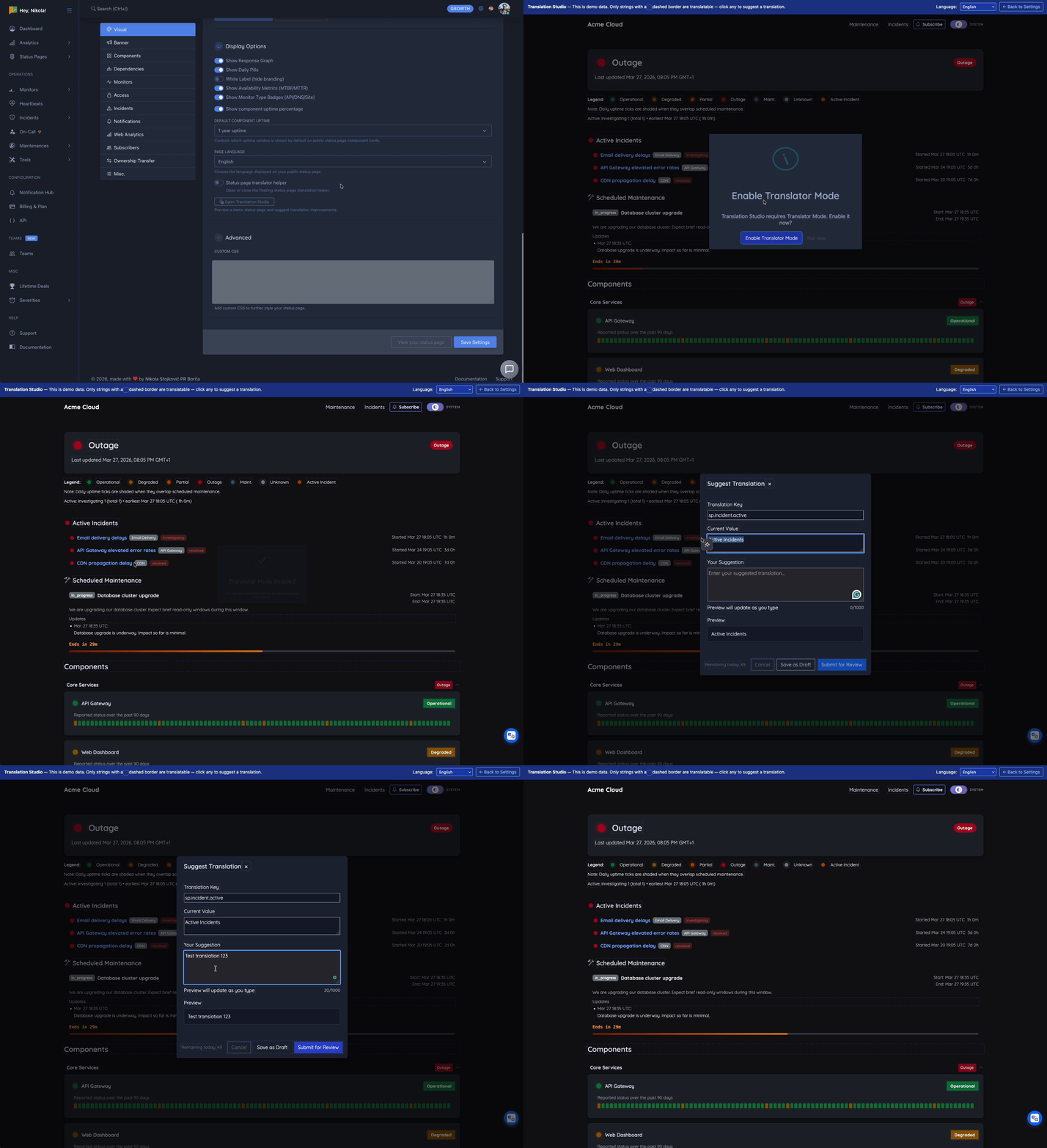
View the WebP recording if the GIF doesn’t load

Manage Drafts and Submissions
Open /user/translations to manage everything in one place.
From there you can:
- review your drafts
- edit unfinished suggestions
- delete drafts you no longer want
- submit suggestions when they are ready
- track whether a suggestion is pending, approved, rejected, or applied
What Happens After You Submit
Every submitted suggestion goes through review before it becomes live.
Typical flow:
- You submit a suggestion
- The admin team reviews it for quality and consistency
- Approved suggestions are grouped by language
- Approved changes are published through a safe apply pipeline with backup and verification
This review step keeps translations consistent and reduces accidental breakage in shared language files.
If your account is marked as a trusted translator by an admin, your submitted suggestions can skip manual approval and move directly into the approved publishing flow.
Daily Limits
To keep review manageable and maintain quality, Translation Studio has daily limits.
| User Type | Daily Limit |
|---|---|
| Regular user | 50 suggestions per day |
| Trusted translator | 250 suggestions per day |
Trusted translator status is granted by the admin team to contributors with a strong track record of accurate submissions.
Trusted translators also bypass manual admin approval when submitting suggestions.
Tips for Better Translations
- Keep the meaning aligned with the English original
- Preserve placeholders such as
{{count}},{{name}}, and URLs exactly - Keep UI copy short enough to fit buttons, tables, and labels
- Reuse existing terminology where possible so the product feels consistent
- Leave technical terms in English when that is the clearest convention in your language
Request a New Language
Need another language?
Open an issue in the public translations repository:
Include the language name and code if you know it. Once the language is added, contributors can start improving it through Translation Studio.
Open-Source Translation Repository
Translation files are maintained in the public repository below:
github.com/hosted-status-page/translations
That gives contributors a transparent view of the source files behind the product and makes it easier to request new languages or review current language coverage.