Last updated: 2026-05-18
StatusPage.me maintains a suite of free website tools you can run without creating an account. Each tool solves a specific diagnostic question — no signup required, no ads, no data sold. If you need repeat checks with stored history and permalinks, the free dashboard extends every tool with automation.
The six free tools and what each one checks
Domain WHOIS lookup
Try it: /tools/domain-whois
A WHOIS lookup retrieves the public registration record for a domain: registrar name, registrant contact (where not redacted), registration date, expiry date, name servers, and status codes. The tool parses WHOIS responses across popular TLDs — .com, .net, .org, .io, .rs, .co.uk, and more — and normalizes the output so you can read it without parsing raw WHOIS text by hand.
Who needs it:
- SaaS founders checking when a competitor or prospect domain expires
- IT teams verifying a domain’s registrar before a migration
- Developers confirming name server delegation after a DNS change
- Security teams checking registration age as part of phishing triage
What to do when you spot a problem:
If a domain you own is approaching expiry, renew immediately — most registrars offer auto-renew, but it can silently fail. If you see unexpected name servers, investigate whether DNS has been hijacked or changed by a team member without a record.
Domain age calculator
Try it: /tools/domain-age
Calculates a domain’s age from its WHOIS creation date and presents it as a human-readable value (years and days). Handles the most common WHOIS date formats across registries, so inconsistent raw timestamps don’t produce wrong results.
Who needs it:
- SEOs assessing how much “trust” a domain has accumulated (older domains often rank faster for new content)
- Procurement teams doing basic due-diligence before acquiring a domain
- Marketers evaluating backlink opportunities — a young domain with many links is a red flag
- Security analysts flagging freshly registered domains used in phishing campaigns
What to do when you spot a problem:
A domain younger than six months should receive extra scrutiny in security contexts. For SEO, a young domain needs more time and more links before it will rank competitively — there is no shortcut around domain age.
SSL certificate checker
Try it: /tools/ssl-checker
Connects to the domain on port 443 (or a custom port), fetches the live TLS certificate chain, and reports: the issuer (Let’s Encrypt, DigiCert, Sectigo, etc.), the subject and SANs, the validity window, days until expiry, and whether the chain is complete and trusted. Common misconfigurations caught include expired certificates, hostname mismatches, and missing intermediates.
Who needs it:
- DevOps engineers doing a pre-launch checklist before going live
- SaaS teams with many custom-domain customers who need quick certificate triage
- On-call engineers troubleshooting a “not secure” warning reported by a user
- Procurement teams verifying a vendor’s security posture
What to do when you spot a problem:
An expired certificate blocks HTTPS access for all users and often kills API integrations silently. If expiry is within 14 days and you use Let’s Encrypt, check that your ACME renewal cron job or certificate manager (Certbot, cert-manager) is running. If the chain is incomplete, your server is missing an intermediate certificate — add it to your TLS configuration.
DNSBL blacklist checker
Try it: /tools/dnsbl-checker
Checks whether a domain or IP address appears on common DNS-based blocklists (DNSBLs). Blocklists are maintained by anti-spam organizations and are queried by mail servers, firewalls, and security tools to decide whether to accept or block traffic.
Who needs it:
- Email deliverability engineers diagnosing high bounce rates or spam folder placement
- SaaS founders whose transactional email provider IP has been blacklisted
- IT admins whose office IP was flagged after a compromised machine sent spam
- Security teams investigating whether a supplier’s domain has a poor reputation
What to do when you spot a problem:
Most blocklists provide a self-service delist form. Identify which lists you appear on, determine the root cause (compromised server, misconfigured mail relay, spam complaint), fix the underlying issue first, then submit removal requests. Some lists (like Spamhaus) auto-delist once the cause is resolved; others require a manual request.
DKIM / SPF / DMARC checker
Try it: /tools/dkim-spf-checker
Validates three email authentication DNS records for a domain:
- SPF (Sender Policy Framework): Lists which mail servers are authorized to send email from your domain. The tool fetches your
TXTSPF record and checks for common errors: missing includes, too many DNS lookups (the 10-lookup limit), and a missing~allor-allqualifier. - DKIM (DomainKeys Identified Mail): Fetches the public key for a given DKIM selector. You supply the selector used by your email provider (e.g.,
googlefor Google Workspace,s1ork1for many ESPs). - DMARC: Checks for a
_dmarcTXT record and reports the policy (none,quarantine, orreject), alignment mode, and aggregate/forensic report addresses.
Who needs it:
- Email teams diagnosing deliverability problems — SPF/DKIM/DMARC misalignment causes Gmail and Outlook to route email to spam
- Developers setting up a new sending domain for transactional email
- Security teams hardening against domain spoofing and phishing
What to do when you spot a problem:
A missing or broken DMARC record with p=none means you have no protection against spoofing. Progressively tighten: start with p=none plus reporting addresses, monitor reports for two weeks, then move to p=quarantine, then p=reject. A failing SPF record usually means a new sending service (CRM, support tool, newsletter platform) was added without updating the DNS record.
Uptime checker
Try it: /tools/uptime-checker
Performs an on-demand HTTP/HTTPS request to a URL and reports whether it is reachable, the HTTP status code returned, and the response time. Answers “is this website down for everyone, or just me?” in one click.
Who needs it:
- Anyone who receives a user complaint about a site being unreachable and needs a second opinion from outside their network
- Developers confirming a deployment went live
- Support agents triaging whether an issue is widespread or user-specific
What to do when you spot a problem:
A non-200 status code or timeout from an external check confirms the issue is not local. Check your server logs, your CDN dashboard (Cloudflare, Fastly, CloudFront), and your origin health endpoint. For recurring issues, move from one-off checks to automated monitoring — see below.
Public tools vs. paid alternatives
StatusPage.me’s tools are deliberately lightweight and free. Here is how they compare to established paid tools for common use cases:
| Tool | StatusPage.me | MXToolbox | Qualys SSL Labs | SecurityTrails |
|---|---|---|---|---|
| Domain WHOIS | ✓ Free, no signup | ✓ Free (rate-limited) | — | Paid for bulk |
| SSL check | ✓ Free, live cert | — | ✓ Deeper grading | — |
| DNSBL check | ✓ Free | ✓ Free (wider list) | — | — |
| DKIM/SPF/DMARC | ✓ Free, all three | ✓ Free | — | — |
| Domain age | ✓ Free | — | — | Paid |
| History & automation | ✓ Free dashboard | Paid | — | Paid |
| Permalink sharing | ✓ Free | — | — | — |
For one-off checks, MXToolbox covers more DNSBL lists and Qualys SSL Labs gives a detailed grading report. For teams that need stored history, repeatable checks, and shareable permalinks — all free — the StatusPage.me dashboard is the better fit.
Automating checks from the free dashboard
The public tools are for quick lookups. The dashboard versions add:
- History: Every check is stored with a timestamp so you can compare results over time.
- Permalinks: Each result has a stable URL you can share with teammates or paste into an incident ticket.
- Cache control: Use force-fresh when you need a live pull instead of a cached response.
- SSL monitoring: Set up a recurring SSL certificate monitor that alerts you before a certificate expires.
- DNSBL monitoring: Automated periodic blacklist checks with alerts if your domain or IP appears.
- Email auth monitoring: Recurring DKIM/SPF validation so a misconfigured DNS change doesn’t go unnoticed.
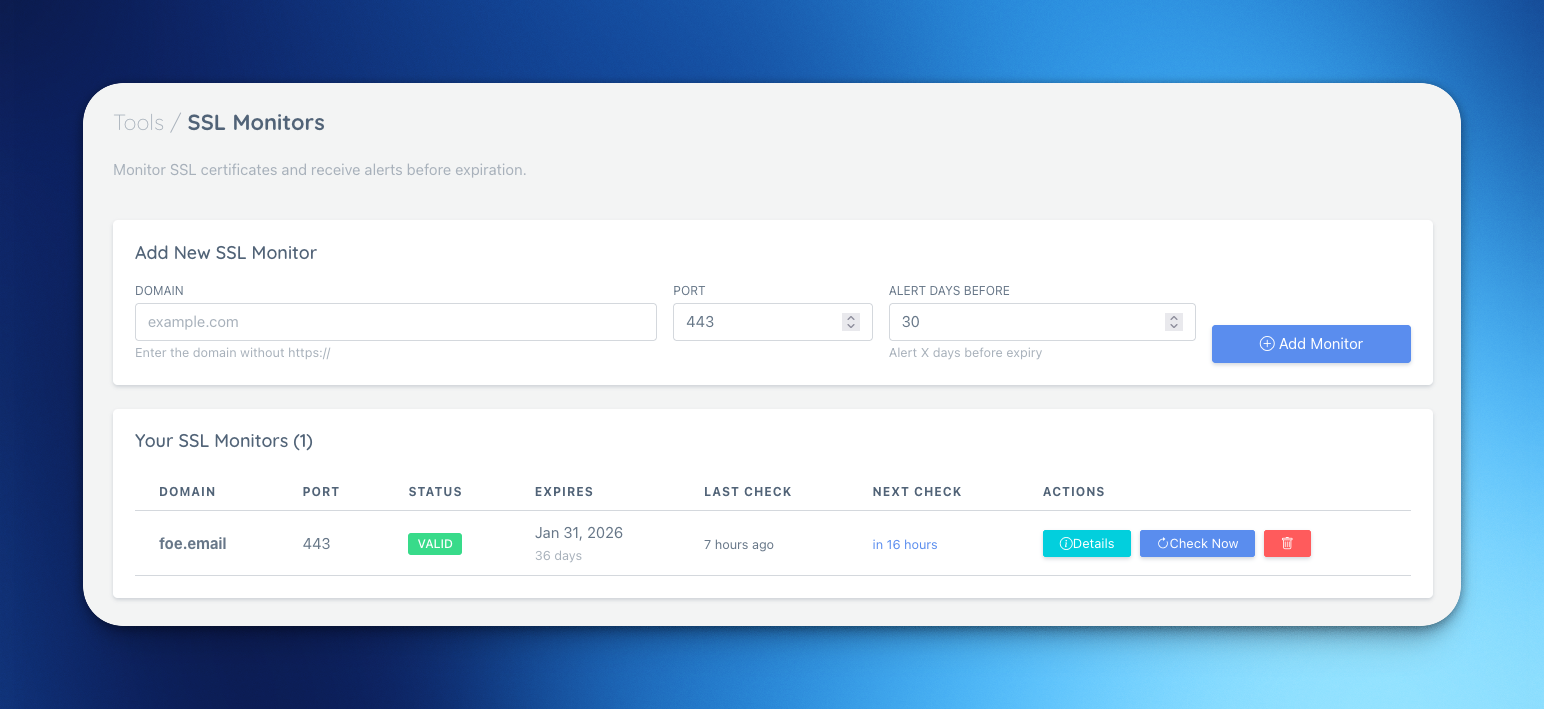
How to get started:
- Create a free account — no credit card required.
- Open Tools in the sidebar to run on-demand WHOIS, domain age, or SSL checks.
- Go to Monitors → SSL, Monitors → DNSBL, or Monitors → Email Auth to set up automated checks.
- Copy any result’s permalink to share it with your team.
For plan limits and check intervals, see pricing.
FAQ
Are these tools really free?
Yes. Every public tool on /tools/ runs without a signup. The dashboard automation path (history, scheduled checks, alerts) is available on the free plan — no credit card required.
What’s the difference between the public tools and the dashboard versions?
The public tools give you a one-off result for any domain. The dashboard versions store each result in history with a timestamp, give you a stable permalink, let you bypass the cache on demand, and support scheduling so you get alerted automatically if something changes.
Can I bypass cached results?
Yes. The public tools use short-lived caches to keep response times fast. If you need a live pull — for example, right after updating a DNS record — use the force-fresh option.
Do these tools replace uptime monitoring?
No. One-off checks confirm a current state but do not alert you when things change. For continuous, multi-region monitoring with incident alerts and status page integration, use uptime monitoring.
How do I check whether my email domain is properly configured?
Use the DKIM/SPF checker. Enter your domain and the DKIM selector from your email provider’s setup guide. The tool validates SPF, DKIM, and DMARC together and highlights specific problems.
What should I do if my domain appears on a DNSBL?
Identify the specific list(s) using the DNSBL checker, fix the root cause (compromised server, open relay, spam complaints), then submit a delist request via each list’s delist form. Do not request removal before fixing the root cause — most lists will re-add you automatically.