
Last updated: 2026-05-18

We all make mistakes. Mine? I deployed a new version of the site and forgot to protect the /register route. Then I went AFK. By the time I checked back, over 250 fake accounts had been created by bots.
This happened while building StatusPage.me, and it was a good reminder that “small” auth endpoints still need boring, reliable protection — even on a product that serves status pages, not financial data.
The good news? I had already been working on a small invisible captcha library: a honeypot-based solution that costs zero UX friction for real users but stops most bots instantly. I finalized it, integrated it, and released it as gocaptcha.
What is a honeypot captcha?
A honeypot captcha adds a hidden input field to your form. Real users never see or fill it — it is hidden with CSS. Bots, which typically fill every visible and hidden field they can find in the HTML, fill it automatically. The server checks whether the field is populated; if it is, the request is rejected as bot traffic.
The technique is decades old, still works on the vast majority of commodity spam bots, and has essentially zero impact on legitimate users.
How do you stop spam signups with a honeypot captcha?
Add a hidden input field that real users never fill, then reject requests where that field is populated. Pair it with IP-based rate limiting so bot operators cannot simply remove the honeypot trigger and retry at scale. The combination stops automated signups at near-zero cost in user experience.
What I did
- Added a hidden
<input>to the registration form, namednickname— something plausible enough that a bot would fill it without hesitation. - On form submission, the server checks whether
nicknameis non-empty. If it is, the request is almost certainly a bot and is rejected. - Wrapped the logic in a Gin middleware and released it as
gocaptcha— any Gin-based app can plug it in with a few lines.
The results
After deploying the honeypot middleware, the effect was immediate.
Spam signups dropped from hundreds per day to zero — instantly.

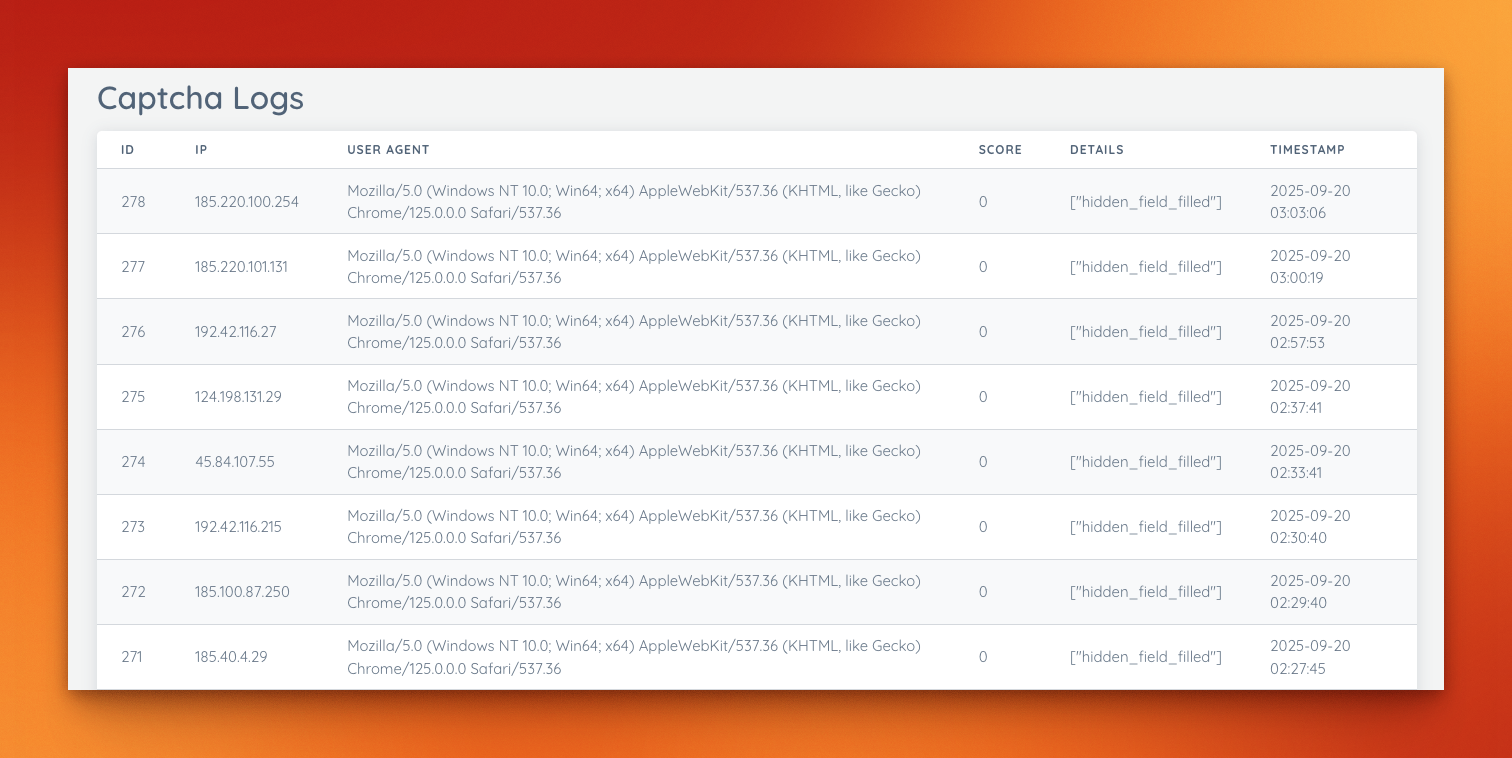
Here is a screenshot from the admin dashboard showing the captcha logs and the now-empty /register spam queue:
How to implement it
1. Add the hidden input to your form
<form action="/register" method="post">
  <input
    type="text"
    name="nickname"
    style="position:absolute;left:-9999px;top:auto;width:1px;height:1px;overflow:hidden;"
    autocomplete="off"
    tabindex="-1"
    aria-hidden="true"
  >
  <!-- visible fields here -->
</form>
Important details:
- Use CSS to hide it, not
display:noneortype="hidden"— some bots ignore invisible or hidden-type fields but fill positioned-offscreen ones. - Use
tabindex="-1"so keyboard users cannot accidentally tab into it. - Use
autocomplete="off"so browser autofill does not populate it.
2. Validate on the server using gocaptcha
import (
  "github.com/gin-gonic/gin"
  "github.com/dragstor/gocaptcha"
)

r := gin.Default()

cap := gocaptcha.New(gocaptcha.Config{
    ShowBadge:      true,
    BadgeMessage:   "Protected by GoCaptcha",
    RateLimitTTL:   time.Minute,
    RateLimitMax:   10,               // max 10 attempts per IP per minute
    EnableStorage:  true,             // SQLite logs for auditing
    DBPath:         "./captcha.db",
    BlockThreshold: -5,               // block IP when score <= -5
    SkipPaths:      []string{"/auth/", "/oauth2/"},
    TrustProxyHeaders: true,          // respect X-Forwarded-For behind Caddy / nginx
})

r.POST("/register", func(c *gin.Context) {
    if cap.CheckRequest(c.Request) {
        // Redirect to login — bots "feel" like they succeeded, reducing retries
        c.Redirect(http.StatusSeeOther, "/user/login")
        return
    }
    // continue with real registration logic
})
gocaptcha handles the honeypot check and the rate limiter in a single call. The BlockThreshold lets you progressively penalize the same IP across multiple bot attempts.
Why honeypots beat CAPTCHAs for most bots
Most commercial CAPTCHA alternatives fall somewhere on a spectrum between user friction and bypass resistance:
| Solution | User friction | Bot bypass rate (commodity bots) | Implementation effort | Cost |
|---|---|---|---|---|
| Honeypot | None | Low — most commodity bots fail | Minutes | Free |
| reCAPTCHA v2 (checkbox) | Medium — checkbox + image puzzle | Low | Low | Free (Google collects data) |
| reCAPTCHA v3 (invisible) | None | Medium — score-based, tunable | Low | Free (Google collects data) |
| hCaptcha | Medium | Low | Low | Free tier available |
| Cloudflare Turnstile | Very low | Low | Low | Free tier available |
| Email verification only | Low (email step) | Medium — bots use temp addresses | Low | Free |
When to use a honeypot alone: Your audience is mainstream users, you are running a Go/Gin app, and you want zero added friction. Stops 80–90 % of commodity spam bots with no libraries, no third-party requests, and no privacy implications.
When to add a secondary control: You are dealing with targeted bots that scrape your HTML and remove honeypot fields before submitting, or with services that use human CAPTCHA solvers (common for high-value targets). In that case, layer honeypots with Cloudflare Turnstile (minimal friction, GDPR-friendlier than reCAPTCHA) or rate limiting.
reCAPTCHA note: Google’s reCAPTCHA embeds a cross-site tracking script. For a product like StatusPage.me — where the status page is a trust signal for your users — embedding Google tracking is a brand mismatch. Turnstile or a pure honeypot avoids this.
Rate limiting as a second layer
A honeypot stops unsophisticated bots. A rate limiter stops bots that keep trying after the honeypot trigger changes (if you rotate field names) or that submit valid-looking data at volume.
gocaptcha has rate limiting built in (RateLimitTTL and RateLimitMax), but you can also add middleware-level rate limiting independently. Here is the pattern used in StatusPage.me for public tool endpoints:
// internal/middleware/rate_limit.go pattern
var registerLimiter = newRateLimiter(5, 1*time.Hour) // 5 signups per IP per hour

func CheckRegisterRateLimit(c *gin.Context) bool {
    if !registerLimiter.isAllowed(c.ClientIP()) {
        c.Header("Retry-After", "3600")
        c.JSON(http.StatusTooManyRequests, gin.H{"error": "too many requests"})
        c.Abort()
        return true
    }
    return false
}
Apply it before your registration handler:
r.POST("/register", func(c *gin.Context) {
    if middleware.CheckRegisterRateLimit(c) { return }
    if cap.CheckRequest(c.Request) {
        c.Redirect(http.StatusSeeOther, "/user/login")
        return
    }
    // registration logic
})
Five signups per IP per hour is aggressive enough to stop bots running at scale and lenient enough that legitimate users — who almost never create more than one account — never hit the limit.
Caveats and edge cases
Headless browser bots: Tools like Puppeteer and Playwright render pages in a real browser, execute JavaScript, and can be scripted to skip honeypot fields. A pure honeypot does not stop these. For registration forms at serious risk of targeted automated abuse, add Cloudflare Turnstile.
AI-assisted solvers: Some bot farms use on-demand human solvers or LLM-driven automation to bypass visual CAPTCHAs. A honeypot has no opinion on AI — if the bot is instructed to skip the hidden field, it will. The rate limiter becomes your primary defence here.
Autofill edge cases: Aggressive browser autofill can sometimes populate offscreen fields, triggering false positives. Using autocomplete="off" and tabindex="-1" on the honeypot field mitigates this for all major browsers.
Email verification is still required: A honeypot prevents fake account creation, but you still need email verification to confirm ownership of real email addresses. Bots occasionally use real but abandoned email addresses. Without verification, a real-looking signup from someone@gmail.com lands in your user table even if it was automated.
FAQ
Are honeypots enough on their own?
For most indie SaaS products and small-to-medium public forms: yes, combined with rate limiting and email verification. For high-value targets (fintech, crypto, anything bots monetize directly), layer honeypots with a privacy-respecting CAPTCHA like Cloudflare Turnstile.
Will this block real users?
No, if implemented correctly. Real users never see the hidden field (it is offscreen via CSS), never tab into it (tabindex="-1"), and browser autofill skips it (autocomplete="off"). The false-positive rate in production has been zero for StatusPage.me.
Do I need JavaScript for a honeypot?
No. The honeypot and rate limiter are both server-side. A user with JavaScript disabled triggers the same server-side validation as any other user. This is one advantage over JS-based CAPTCHA solutions, which often fail completely without JS.
Why redirect bots instead of returning a 4xx error?
Returning a 400 or 403 tells the bot operator the submission was rejected. A redirect to /user/login makes the bot “feel” like it succeeded, which can reduce retries and slow the operator’s feedback loop. It is a small but occasionally useful deterrent.
Does this work with frameworks other than Gin?
The gocaptcha library is Gin-native. The underlying principle — a hidden field + server-side check — works in any web framework. The HTML snippet and the server-side field check are framework-agnostic; only the middleware wrapper is Gin-specific.
Should I rotate the honeypot field name?
Occasionally. Determined bot operators can scrape your registration form, identify the honeypot field by its CSS properties, and instruct their bot to skip it. Rotating the field name every few weeks (or randomizing it per page load) raises the cost of targeting you specifically. For most apps, this is not necessary.
Want to try it yourself? Grab gocaptcha from GitHub: https://github.com/dragstor/gocaptcha
It’s lightweight, Gin-native, and it completely solved my bot problem.
If you also care about keeping your pages privacy-friendly, see: Privacy-First Web Analytics for Status Pages